Loading filters, please wait...
Manage firm expenses, reimbursements, petty cash, and operational financial records.

Monitor your “Total Collected” versus “Total Billable” amounts at a glance to ensure your firm’s cash flow remains positive and predictable.

Maintain a detailed “Office Account Statement” that logs every credit and debit, providing a transparent audit trail of all internal financial movement.

Effortlessly record professional fees and recoverable disbursements, linking them directly to specific matters for accurate client billing.

Manage receipts and payments with ease, including support for multiple payment methods, bank references, and automated receipt numbering.

Access high-level summaries of “Fees,” “Disbursements,” and “Taxes” (GST/SST) to get a clear picture of your firm’s earnings and liabilities.

Filter and search through historical transactions by date, matter, or description to simplify bank reconciliation and month-end closing.
Oversee firm operations, approvals, workflows, and administrative controls for smooth daily management.


Maintain a secure record of your firm’s PII policies, including policy numbers, insurers, and coverage amounts to safeguard your practice against liability.

Track “Practising Certificates” for every lawyer in the firm, complete with bar numbers and renewal dates to ensure everyone is legally authorized to work.

Log annual “Audit” details and upload “Financial Statements” directly to the module to maintain a clear trail for corporate governance.

Stay compliant with inland revenue requirements by tracking “Tax Filing” statuses, submission dates, and fiscal year records in one central location.

Organize and manage your “Panel Solicitors” list, linking your firm to specific banks or corporate panels with detailed appointment records.

Use the unified list view to monitor the status of all professional certificates and insurance policies, preventing lapses in coverage or legal standing.
Browse, upload, and organize documents across all matters, projects, and departments with secure access controls.


Navigate your firm’s data using a classic folder-tree structure that makes managing thousands of files intuitive and organized.

Effortlessly access document repositories linked directly to specific modules like “Contacts,” “Projects,” and “Account Manager.”

Streamline your workflow by uploading multiple documents simultaneously with a modern “Drag & Drop” interface and real-time progress tracking.

Locate specific files in seconds using global search or quick filters to sort by file name, upload date, or associated category.

Maintain a “Single Version of Truth” by centralizing files that are used across different departments, preventing duplicate or outdated versions.

Experience high-performance file retrieval with a responsive interface designed to handle large attachments and complex folder hierarchies.
Monitor financial performance, generate reports, and oversee revenue, collections, and account health.


Easily define and manage multiple tax types including GST, SST, and VAT with specific rates and effective dates to ensure automated, accurate invoicing.

Set up essential statutory contributions like Retirement Funds (EPF), Work Insurance (SOCIO/EIS), and custom Salary Deductions for seamless payroll integration.

Manage various Currencies with real-time exchange considerations and maintain a secure directory of all firm and client Bank Accounts.

Attach detailed Account Notes to specific financial records to provide context for audits or internal tracking of special billing conditions.

Keep your financial database organized by creating custom Account Folders, allowing you to group related accounts by department or project.

Establish the core settings that power every other module—from “Payroll Runs” in HR to “Client Account” tracking in Billing—ensuring “Single Version of Truth” data.
A central overview of your firm’s activities, showing key metrics, recent updates, and quick shortcuts for daily operations.


Track your firm’s “Total Billable” amount and “Total Collected” fees at a glance to maintain healthy cash flow management.

Monitor live staff attendance with a summary of total staff present, late arrivals, and absences directly on the main screen.

Never miss a critical date with a built-in “Upcoming Events” feed that highlights today’s most important tasks and meetings.

View a breakdown of your “Active Matters” to gauge current workload and ensure resources are allocated effectively across the firm.

Stay updated with a chronological log of firm-wide actions, from new document uploads to status changes in real-time.

Seamlessly jump to specific modules like “KnowledgeShare” or “Denning Hub” using the integrated sidebar for a fast, modular workflow.
Get curated industry news, legal updates, and system enhancements to keep your platform running at its best.


Get instant access to the latest “What’s New” posts, detailing feature releases and system enhancements as they happen.

Stay informed on industry shifts with legal news articles pushed directly to your feed, keeping your practice current and compliant.

Master the ERP with ease through embedded YouTube tutorials that walk you through complex features step-by-step.

Use the integrated “Contact Support” and “Remote Support” links to get expert help via WhatsApp or TeamViewer whenever you need it.

Engage with shared content through view counters and “likes,” helping the Denning team identify which updates are most valuable to you.

View detailed announcements or watch training videos in a clean, distraction-free modal window without leaving your workspace.
Track non‑legal projects with structured workflows, milestones, and team assignments for smooth execution.


View and manage your entire portfolio of developments from a high-level list, complete with project codes, names, and real-time status updates.

Record comprehensive background data including the Project Name, Developer details, and the total Number of Units involved.

Log precise location data, from the State and District down to the specific Mukim and Section, ensuring accurate land identification.

Track vital technical data such as Lot Numbers, Title types, and Tenure (Freehold/Leasehold) to maintain a complete legal record of the site.

Associate projects directly with developers and key stakeholders, allowing for instant access to contact information and related legal entities.

Seamlessly link individual legal matters or property units back to their parent project for unified reporting and progress tracking.
Your master directory for clients, suppliers, and stakeholders, with full profiles, communication logs, and linked matters.


Save time and ensure tax compliance by searching and validating Tax Identification Numbers (TIN) directly via the LHDN API using just an ID number.

Use the “Briefcase” and “Folder” icons on the list view to jump directly into a contact’s related legal matters or digital files without navigating multiple menus.

Get the details you need at a glance by expanding contact rows directly from the list view, allowing you to check addresses or references without leaving the page.

Manage comprehensive data for individuals and entities, including multiple ID types, occupation details, and contact categories for precise filtering.

Effortlessly locate any contact using specialized filters for ID, Title, or Category, supported by a search engine designed to handle massive databases.

Link contacts across the entire ERP ecosystem—from HR and Payroll to Property and Billing—ensuring “Single Version of Truth” data consistency.
A dedicated hub for property files, ownership details, transactions, and compliance records.


Log every essential detail including Title Type (H.S.D, G.M., etc.), Lot Number, Mukim, and District to ensure 100% legal accuracy.

Record specific property attributes such as Tenure (Freehold/Leasehold), Land Category, and precise Area measurements for a complete asset profile.

Link properties directly to “Additional Contacts” including Registered Owners, Chargees, and local Councils for instant stakeholder access.

Maintain a clear chain of history by linking current properties to “Block Master Titles” or “Previous Titles” for seamless title tracing.

Manage the “Financial” aspect of every property, including List Price, Discount calculations, and final Price Sold with integrated Sale Status updates.

Capture critical “Express/Special Conditions” and “Restrictions in Interest” to ensure all legal hurdles are identified early in the transaction.
Create, share, and archive internal communications, instructions, and firm-wide announcements.


Create structured office notices with clear headers, sender details, and timestamps.

Mark memos as “Urgent” to grab immediate attention and ensure time-sensitive information isn’t missed.

Target your messages by setting visibility to “All Staff” or specific recipient groups for secure, relevant communication.

Enable a dedicated comments section on every memo, allowing staff to ask questions or provide instant feedback.

Compose memos with a full text editor and attach relevant PDF guides or image assets to support your announcement.

Save pending announcements as “Drafts” and manage published content with easy-to-use search, filter, and edit tools.
A central library for precedents, templates, SOPs, and reference materials to support consistent practice.


Create a searchable library of “Knowledge Posts” to document everything from legal amendments to internal standard operating procedures (SOPs)

Use a full-featured text editor to create detailed posts with rich formatting, links, and high-quality image attachments.

Organize insights by categories, status, and custom tags, making it effortless for team members to filter for exactly what they need.

Manage your own impact through the “My Posts” dashboard, where you can view, edit, and track the engagement of your contributions.

See organizational reach at a glance with integrated view counters and “likes” to identify which topics are most relevant to your team.

Highlight critical updates by marking them as “Featured” to ensure they appear prominently on the main dashboard for maximum visibility.
Manage staff profiles, attendance, leave, performance records, and HR workflows in one secure module.


Manage your full staff list and easily “Link New Employees” directly from your existing Contacts to eliminate double data entry.

Track daily clock-ins, manage “Adjustment Requests” for manual corrections, and handle “Overtime Approvals” with a structured workflow.

Monitor “On Leave Today” stats and manage the full lifecycle of leave—from pending approvals and history to setting “Leave Types” and “Initializing Balances.

Switch to the “Calendar View” for a bird’s-eye perspective of team availability, making it easy to plan projects around staff holidays.

Define your firm’s hierarchy by managing custom “Departments” and “Positions” to keep reporting lines and roles clear.

Streamline “Payroll Runs” with individual “Employee Config,” allowing for precise control over “Allowances” and “Deductions” for every pay cycle.
View and manage firm-wide schedules, court dates, deadlines, and personal appointments in a unified calendar.


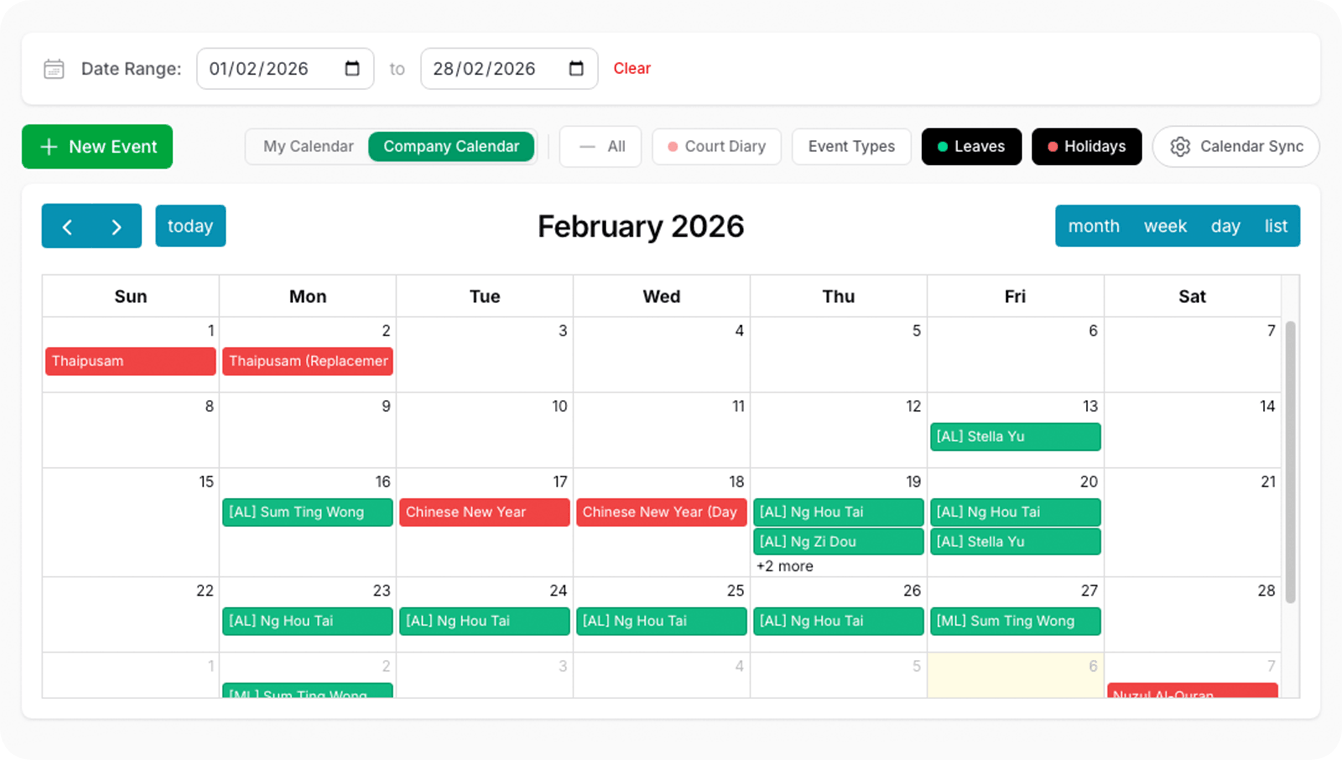
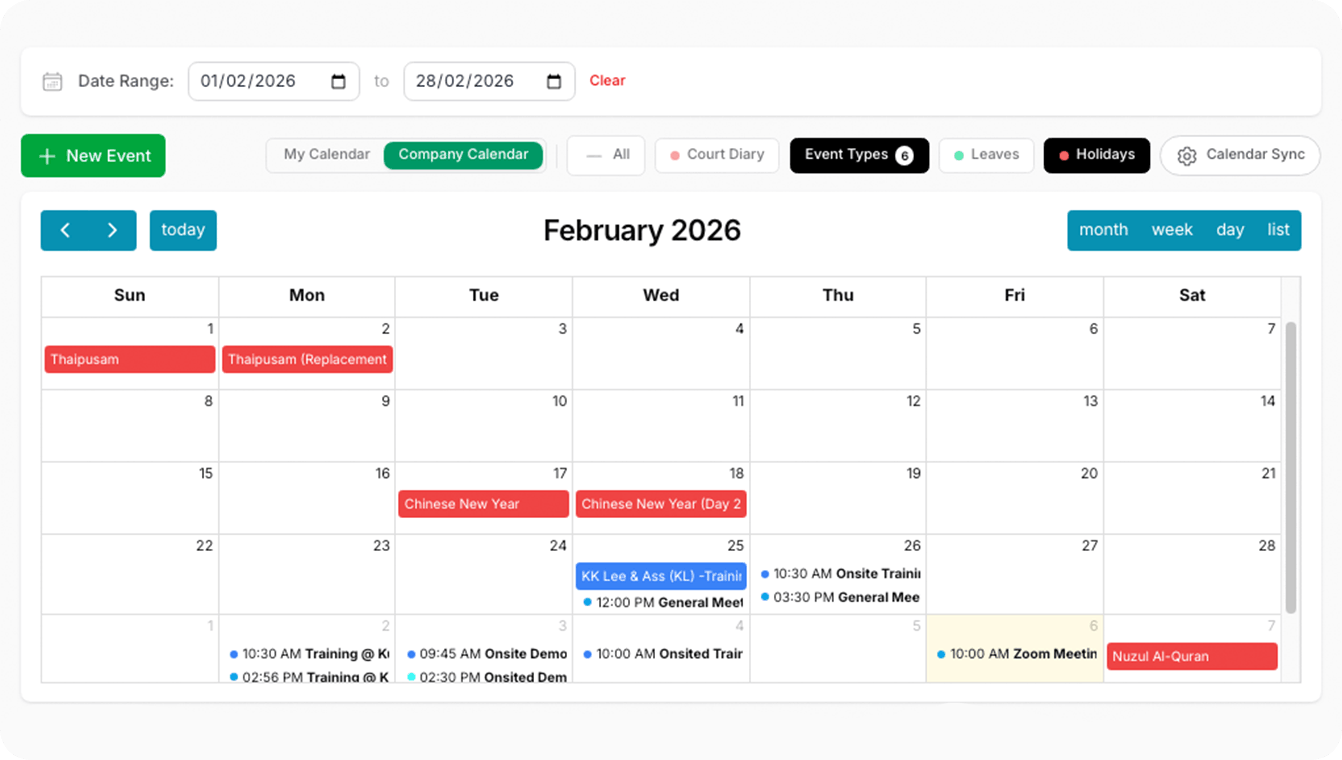
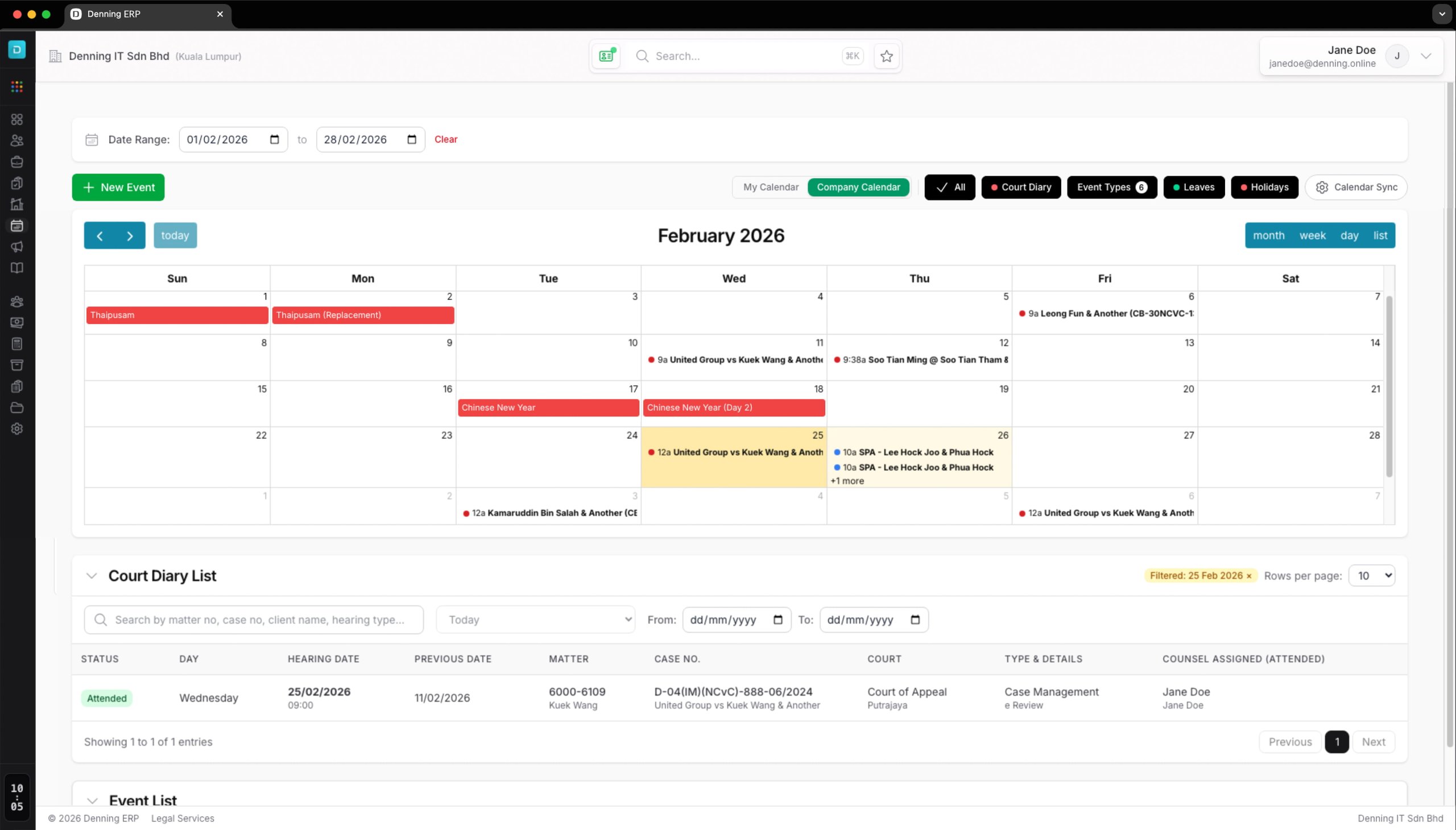
View everything from project deadlines and client meetings to internal events on a single master calendar.

Access dedicated lists for hearing dates and case management to ensure no critical milestone is missed.

Monitor staff leave schedules and internal availability to plan your firm’s capacity effectively.

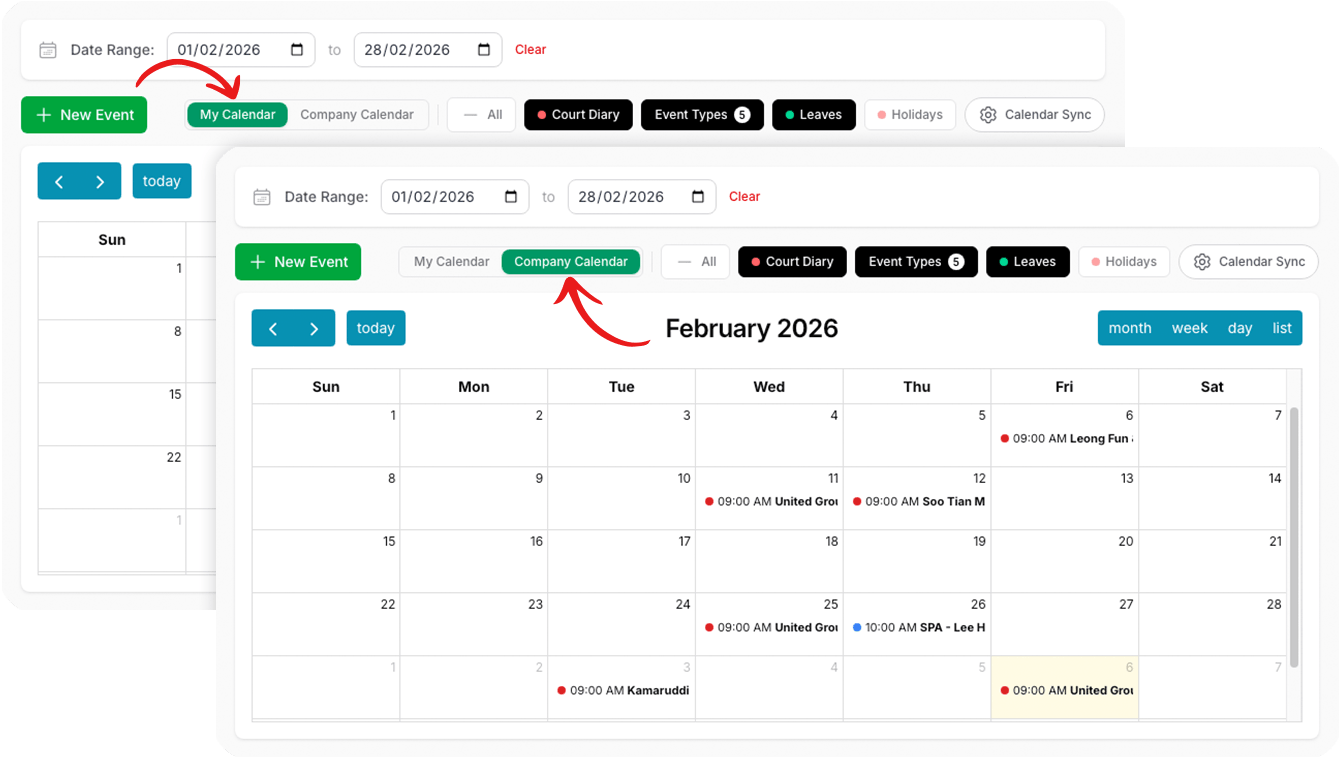
Effortlessly toggle between My Calendar for personal focus and Company Calendar for firm-wide oversight.

Stay informed with pre-loaded public holidays and office-wide event lists integrated directly into your view.

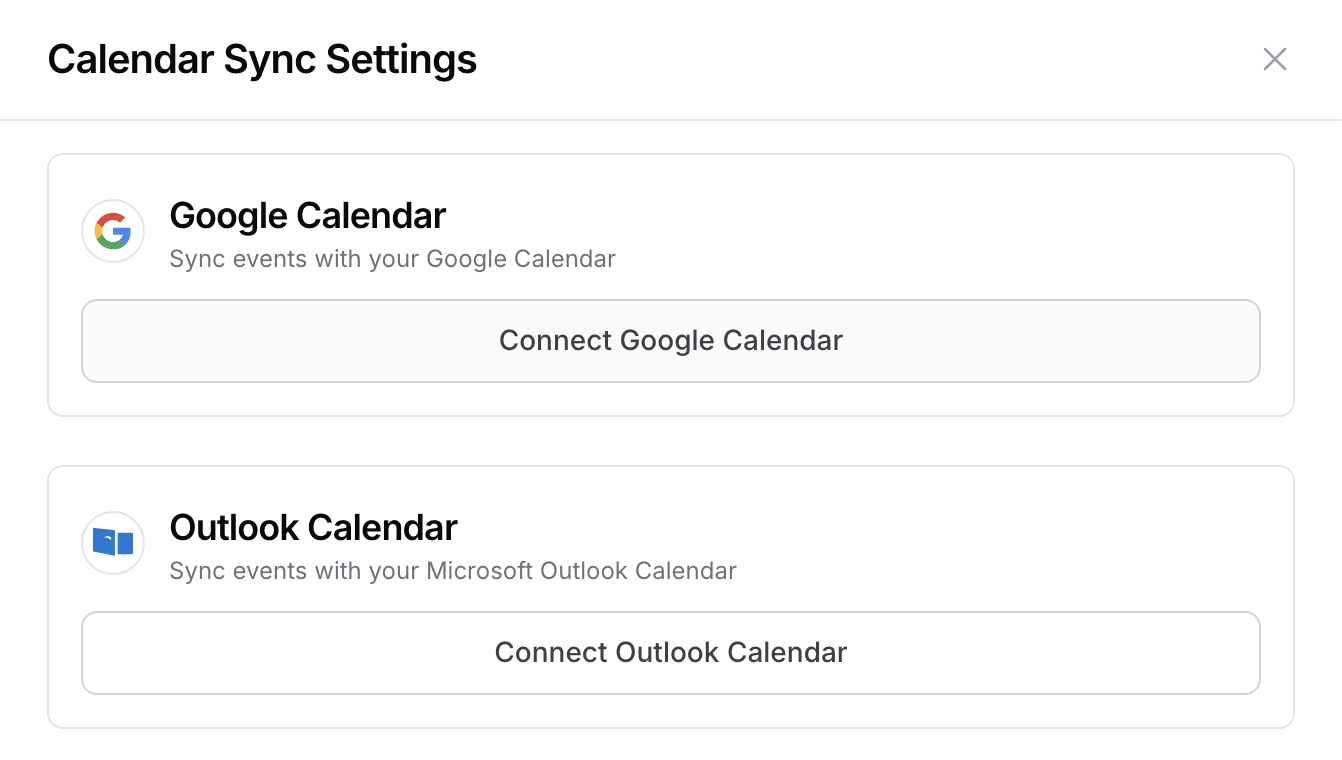
Connect with Google Calendar and Outlook to keep all your professional devices updated in real-time.